
It has been 22 years since I seriously wrote code. Back in 2003 to 2004, I was not a multimedia guy. I was not a writer. I was a coder. I had joined a local computer academy for a 2 year diploma course which was more about code than multimedia. Those who met me after I left my hometown don’t know about my coding days. My degree is in multimedia, a decision I still regret sometimes. Anyway, that is a story for some other day.
During the coding days, I used to play a lot with C and C++, sometimes for hours. This time, things are different. Though I am on the learning track again, I am not going to join any institute. I have chosen to let Artificial Intelligence be my teacher. To be precise, ChatGPT.
Today was day 1 of the learning curve. I quickly realised one thing. AI is extremely enthusiastic. A bit too enthusiastic. It does not understand the pace of a classroom. Within minutes, it was jumping from “hello world” to login, conditions, comparisons, data types and future plans. I had to literally tell ChatGPT to slow down. I need time to grasp everything again. One day at a time. This series is going to be slow, practical, and written as notes.
If someone wants to learn alongside, you can. If not, this is also my personal log of getting back to coding.
But why back to coding? Is it necessary to learn to code in a world where ChatGPT can literally write programs for me? Yes, it is. I am not going to be dependent on AI for tasks that may help in data analysis in coming months. As a journalist, I use data a lot and in future I want to do it as someone who knows how to crunch data, not via Word files, Notepad, PDFs or Excel, of course without using advanced features. I want to be someone who can write some commands and create a program that can, in fact, crunch data for me.
But this is going to be time consuming. I am not that that 18-year-old who had nothing to worry about in life in terms of earning money or anything. I have a full time job, a home to run and well, no family, thanks to being single at 40! Jokes apart, re learning code is going to be a slow process and this is why I want to document it, properly, step-by-step.
So, following is what I learned today.
The first step was to install Python properly. I wanted it to be somewhere where I can access it immediately, so I installed it in C drive after creating a folder named Python314. Note: You need to install Python’s standalone version that developers use. Here is the link.
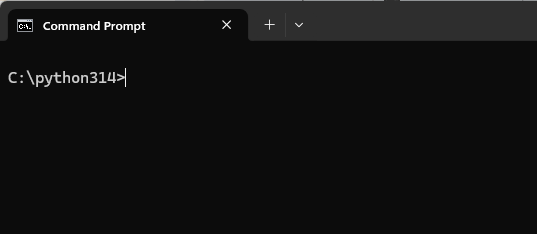
I opened Command Prompt and used cd /python314 to open the folder. This is how it looked.
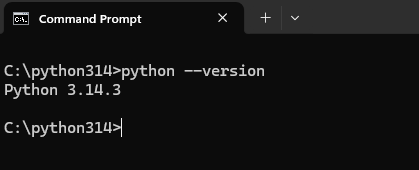
Here, I wrote python –version as instructed by ChatGPT to check if it is working, and it showed me the version. It simply means Python is ready and I was ready to learn again.
The first thing that AI taught me was the print command. For that, I entered Python by typing Python and it looked like this.

Then I typed print(“Hello, World”).
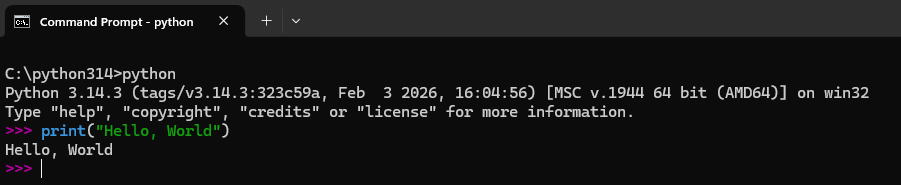
And it worked! Sounds exciting? Not really. For some reason, the coder in me wanted more. Anyway, it was satisfying to see the command working properly.
Step 2 was to write first Python file.
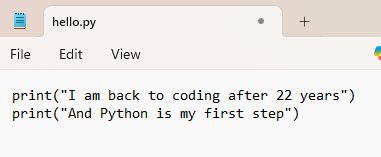
Instead of typing everything in interactive mode, I created a Notepad file called hello.py. First I exited the interactive mode by entering ctrl+z then pressing “Enter“. Then I typed cls to clear the screen.
In that file, I wrote the following as instructed by AI.
print(“I am back to coding after 22 years”)
print(“And Python is my first step”)
I created a new folder named “Python Files” to save my classroom work files and entered the folder by typing cd python files.
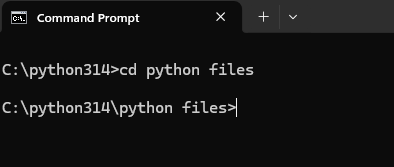
Then I ran the file in Command Prompt using python hello.py
The output was as follows
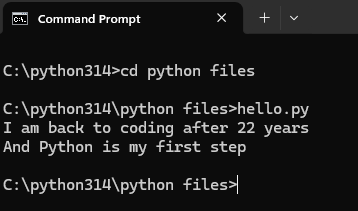
This was the first proper program that I wrote in Python on my Day 1. There was nothing fancy in it but a real .py file has been created and it ran successfully. For a code noob, this will be exciting and for me, it brought back memories of running first ever commands in C!
Step 3 was to learn how to take user inputs. AI asked me to modify the .py file as follows
name = input(“Enter your name: “)
print(“Hello”, name)
print(“Welcome back to coding after 22 years”)
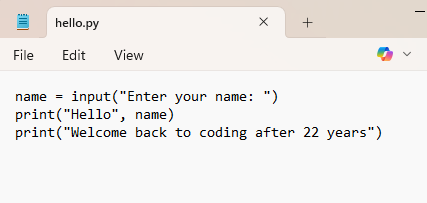
When I ran the file, it asked me to enter my name.
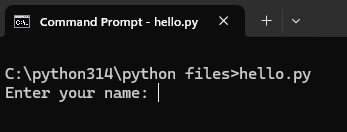
As I entered my name, the output was:
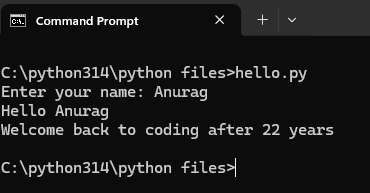
This step introduced two things that are variables and input.
The line name = input(…) takes whatever the user types and stores it in name.
Then print(“Hello”, name) uses that value that it had stored and uses it dynamically.
Step 4 was to learn how to add multiple inputs.
In this step, AI asked me to modify the .py file as follows:
name = input(“Enter your name: “)
age = input(“Enter your age: “)
print(“Hello”, name)
print(“You are”, age, “years old”)
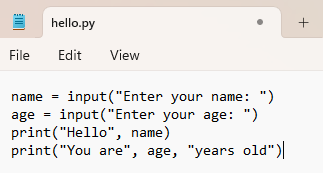
Now, I ran the file again. It first asked me my name.
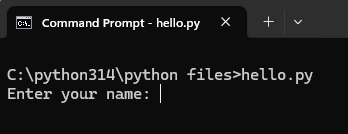
Then it asked me my age.
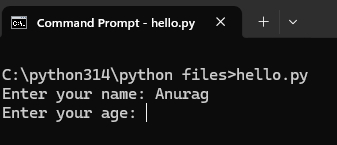
This was the output.
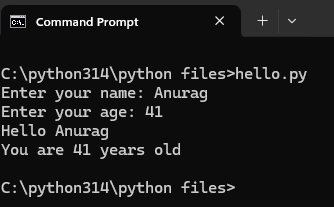
In this case, the program asked me to input my name and age, and it printed them back. Still simple, but now I know how to add two variables and get dynamic output accordingly.
Still simple, but now two variables and dynamic output.
Step 5 was to learn how to run simple calculation. This time, AI asked me to modify the file with the following code.
name = input(“Enter your name: “)
age = int(input(“Enter your age: “))
print(“Hello”, name)
print(“You are”, age, “years old”)
future_age = age + 5
print(“After 5 years you will be”, future_age)
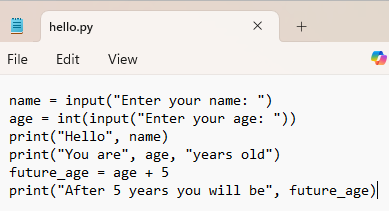
I again gave it my name and age. This time, the output was:
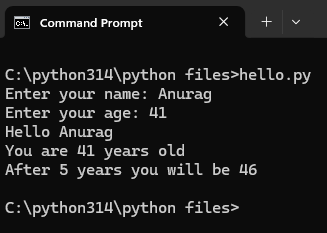
This introduced integer conversion, arithmetic and storing calculated values. Here the important part is age = int(input(…)) and input() returns text. int() converts it to a number. Without this, addition would not work properly. Remember, anything without int is stored as text or in Python language, string. If you add something written in strings, it will add as string and not as number. For example, 41 + 41 in string value is 4141 and not 82.
What I learned today
This was just Day 1, but quite a few basics were part of the learning process.
• writing a .py file
• running Python from terminal
• using print()
• taking input with input()
• storing values in variables
• converting text to number using int()
• simple arithmetic
• checking data type using type()
• dynamic output based on user input
Nothing complex. But this is exactly the point. No rush.
The Appendix
This is a quick reference to everything used in today’s lesson.
print() , This command is used to display output on the screen.
input() , This command is used to take input from the user.
Variable , A variable stores a value. At this time, it is not stored in the database so if I rerun the program, I cannot recall the last value.
String (str) , Text in Python is called a string.
Integer (int) , Whole numbers in Python are called integers. Integers allow mathematical operations like addition.
int() , This command is used to convert text into an integer.
type() , This command is used to check what type of value is.
Assignment using “=” , This is used to store values in variables. Python calculates first, then stores result.
Arithmetic using “+” , This is used for addition. This works only when values are integers, not strings.
Quotes ” “ , Anything inside quotes is treated as text. Without quotes, Python treats it as variable or number.
Function , I used several functions today:
print() shows output
input() takes input
int() converts to integer
type() shows data type
Functions perform specific tasks.
And this is how my “Day 1” of getting back to coding ended. Office exists, responsibilities exist. But that does not mean you cannot learn something new! We will meet again, for the Day 2.